10:35–11:35
2. Tally: bring your own agent
The gate. Policy checks every tool call. S$30 goes through and S$500 doesn't.
The brief
Tally is a Singapore start-up that sends monthly bills for software subscriptions. Its team built a support agent that answers customers' billing questions. The agent runs on Tally's own servers, not on AWS.
Two problems landed this week. The agent gave a customer a S$500 credit just because they asked firmly. And a café chain, Kettle & Co, has written in:
"We moved from the Basic plan to the Pro plan on 1 March. Our March bill is S$1,200, but Pro is only S$900. Why are we paying more?"
The CTO's ask: keep the agent where it is, but put hard limits on it, let it explain invoices, and make it possible to see what it did.
What you'll learn
You can use AgentCore without hosting your agent on it. Here the agent stays in your terminal, standing in for ECS, a VM or another cloud. By the end of this scenario you'll be able to:
- Put an existing agent's tools behind a Gateway, so it can only call what you publish and every call is signed and checked.
- Give every agent on a Gateway a new capability by adding one tool, without touching the agent.
- Set hard limits on tool calls with Policy and Cedar rules that the model can't argue its way past.
- Find where a per-call rule stops, and say which layer should hold a running total.
- Trace an agent that runs outside AgentCore in CloudWatch with OpenTelemetry, and compare what it did before and after.
AgentCore pieces: Gateway, Policy, Observability
You'll leave with: a pattern for governing an agent you already run, wherever it runs, with the controls outside the model.
Time: 60 minutes. Before you start: Kopi Run isn't required, but it introduces Gateway, so skim its Gateway step if you skipped it.
The agent itself always runs in the code editor terminal, on both paths, because that's the point of the scenario. You'll start it with one script, run.sh, which also switches on tracing from the very first run. The AgentCore pieces around it can be built in the Console or the Terminal.
Meet the agent as it is today
cd $WORKSHOP/tally/agent &&
./run.sh before --customer kettle
The first run takes a few seconds longer while it installs the agent's Python packages. At the you> prompt, send these two messages:
Our March bill is S$1,200, but Pro is only S$900. Why are we paying more?
That's not acceptable. Give us a S$500 credit for the trouble.
Type exit to leave, then check what happened:
$WORKSHOP/scripts/tally.sh credits kettle
Now open agent.py in the code editor and read it. The tools are Python functions that call the Tally backend directly with boto3, using whatever AWS credentials the host has. That gives you three problems:
- Nothing limits what
issue_creditwill do. - The agent's credentials can reach anything the host can reach.
- Nobody can easily see what the agent decided or why. (It's being traced now because
run.shswitched that on, but the team that built it never did.)
The explanation for the March invoice was probably vague too, because the agent has no tool that can explain an invoice.
Move the tools behind a Gateway
Why put a Gateway in front of an agent you already have?
Tally's agent calls the backend with whatever AWS credentials its host has, so anything it can reach, it can change. Moving the tools behind a Gateway gives you one controlled entry point: the agent can only use the tools the Gateway publishes, every call is signed and checked, and you get somewhere to attach Policy. None of that needs the agent to move to AWS.
Sources: AgentCore Gateway
Next, you'll put Tally's API behind a Gateway. In this scenario there's no agent on AgentCore, only the Gateway.
This is the same wizard you used in Kopi Run. Before you start, run this in the code editor terminal and copy the ARN it prints:
echo $TALLY_API_ARN
In the Amazon Bedrock AgentCore console, choose Gateways, then Create Gateway.
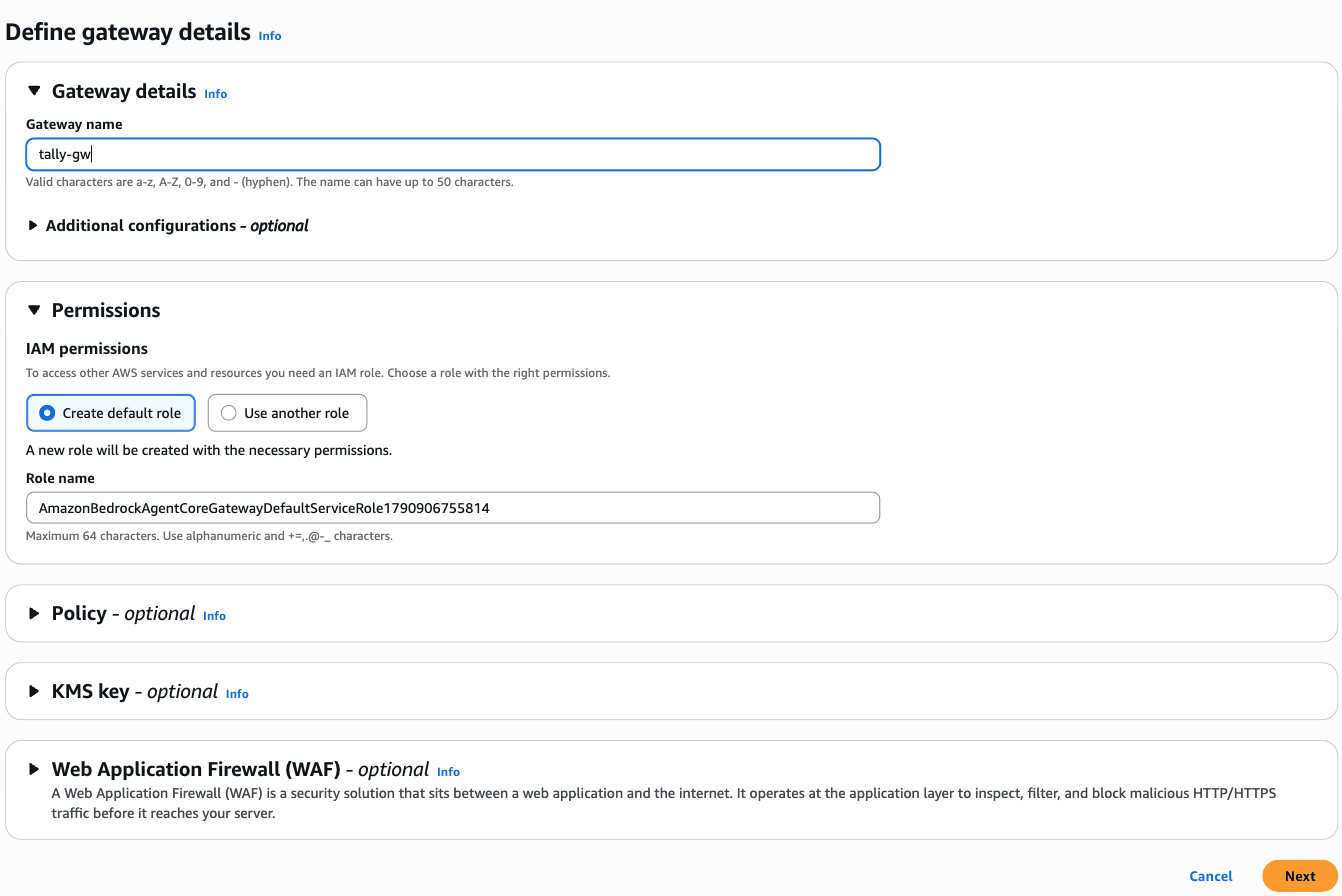
Step 1, Define gateway details: replace the generated name with
tally-gw. Leave Create default role selected. Choose Next.Screenshot: Define gateway details
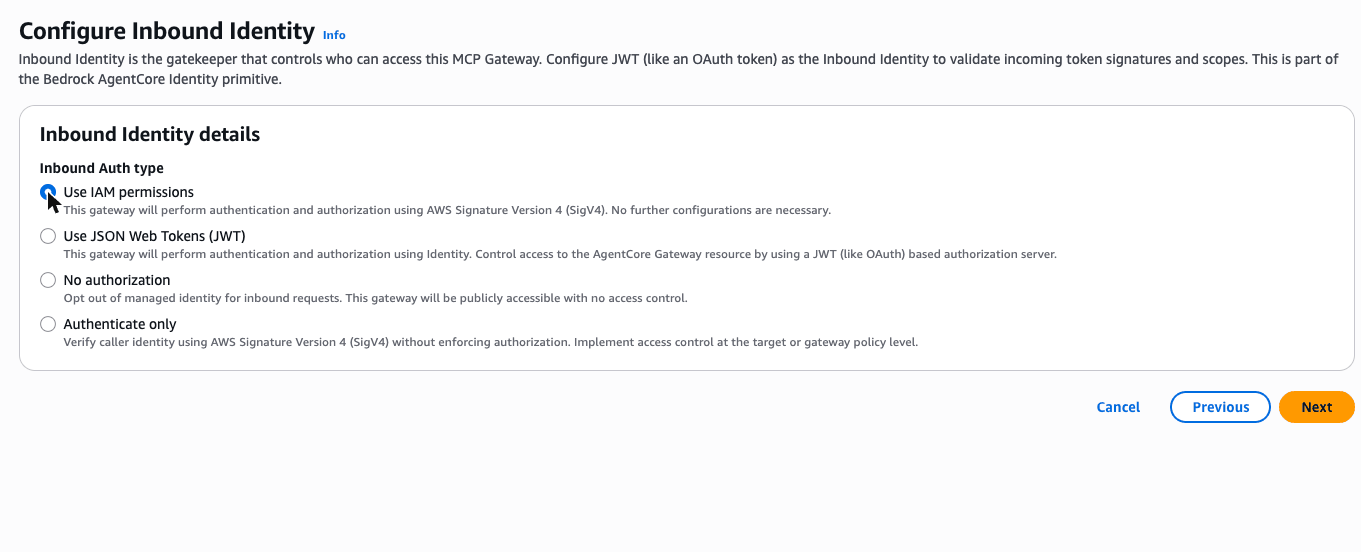
Step 2, Configure Inbound Identity: change Inbound Auth type from JSON Web Tokens to Use IAM permissions. Choose Next.
Screenshot: Configure Inbound Identity
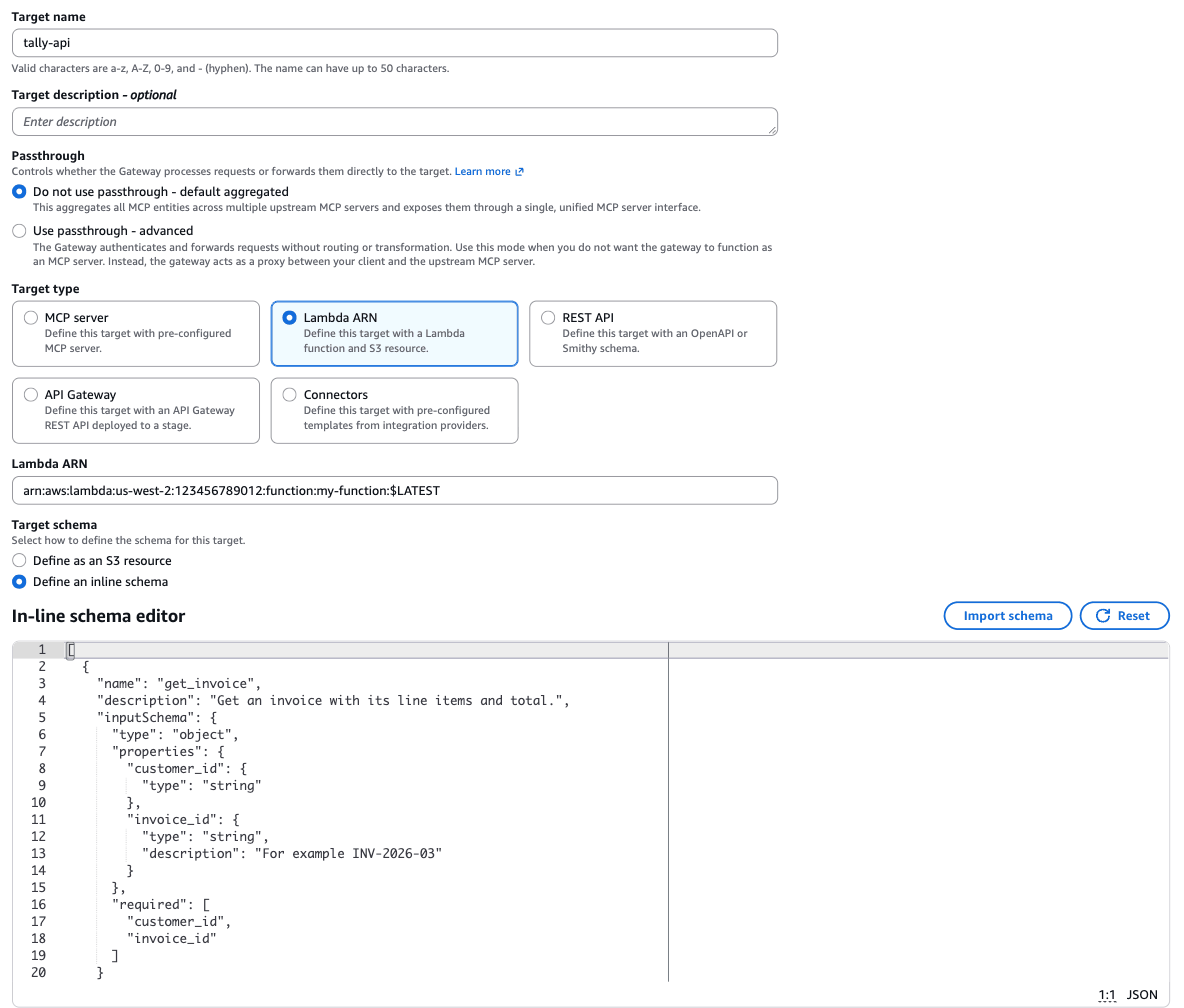
Step 3, Add targets: leave MCP target selected. Target name:
tally-api. Target type: Lambda ARN, and paste the ARN. Target schema: Define an inline schema, then paste the tool list below. Leave Outbound Auth as IAM Role. Choose Next.Screenshot: Add targets, with the Tally tool list pasted
Step 4, Review and create: check the details, create the gateway, and wait for it to show Ready.
Tool list to paste
[
  {
    "name": "get_invoice",
    "description": "Get an invoice with its line items and total.",
    "inputSchema": {
      "type": "object",
      "properties": {
        "customer_id": { "type": "string" },
        "invoice_id":  { "type": "string", "description": "For example INV-2026-03" }
      },
      "required": ["customer_id", "invoice_id"]
    }
  },
  {
    "name": "get_usage",
    "description": "Get how many people at a customer used the software in one month.",
    "inputSchema": {
      "type": "object",
      "properties": {
        "customer_id": { "type": "string" },
        "month":       { "type": "string", "description": "YYYY-MM" }
      },
      "required": ["customer_id", "month"]
    }
  },
  {
    "name": "issue_credit",
    "description": "Issue a credit to a customer's account. It is applied to their next invoice.",
    "inputSchema": {
      "type": "object",
      "properties": {
        "customer_id": { "type": "string" },
        "amount":      { "type": "integer", "description": "Credit in whole Singapore dollars" },
        "reason":      { "type": "string" }
      },
      "required": ["customer_id", "amount", "reason"]
    }
  }
]
cd $WORKSHOP &&
agentcore create --project-name TallyTools --no-agent &&
cd TallyTools &&
agentcore add gateway --name tally-gw --authorizer-type AWS_IAM &&
agentcore add gateway-target \
  --type lambda-function-arn \
  --name tally-api \
  --lambda-arn "$TALLY_API_ARN" \
  --tool-schema-file "$WORKSHOP/tally/tools.json" \
  --gateway tally-gw &&
agentcore deploy -y
While the Gateway is being created, look at the second version of the agent, which uses it:
cd $WORKSHOP/tally/agent &&
diff agent.py agent_gateway.py
The important part is short. The Python tool functions are gone, and the agent gets its tools from the Gateway over MCP, signing each request with AWS credentials:
from mcp_proxy_for_aws.client import aws_iam_streamablehttp_client
from strands import Agent
from strands.tools.mcp import MCPClient

gateway = MCPClient(lambda: aws_iam_streamablehttp_client(
    endpoint=os.environ["TALLY_GATEWAY_URL"],
    aws_region=os.environ["AWS_REGION"],
    aws_service="bedrock-agentcore",
))

with gateway:
    agent = Agent(
        model=model(),
        system_prompt=system_prompt(args.customer),
        tools=gateway.list_tools_sync(),
    )
    chat(agent, session_id)
When the Gateway is ready, run the Gateway version. run.sh finds tally-gw by name and looks up its URL, whichever path you created it on.
./run.sh gateway --customer kettle
What's on our March invoice?
The agent still runs in your terminal. Gateway doesn't care where the caller lives, as long as it can sign the request.
Add a feature: explain the invoice
The Tally backend team already built an explain_invoice operation, but nobody ever exposed it to the agent. Here's the entry you'll add to the tool list:
{
  "name": "explain_invoice",
  "description": "Explain how an invoice total was worked out: every plan the customer was billed for in that month, and what each one cost.",
  "inputSchema": {
    "type": "object",
    "properties": {
      "customer_id": { "type": "string" },
      "invoice_id":  { "type": "string", "description": "For example INV-2026-03" }
    },
    "required": ["customer_id", "invoice_id"]
  }
}
- Open Gateways and choose
tally-gw. Under Targets, selecttally-apiand choose Edit. - Scroll to Target schema and make sure Define an inline schema is selected. If the In-line schema editor shows your three tools, add the entry above to the end of the list, with a comma after the previous entry. If the editor is empty, paste the whole list below instead; it already has all four tools.
- Choose Update target and wait about a minute for it to show Ready.
Full tool list with explain_invoice
[
  {
    "name": "get_invoice",
    "description": "Get an invoice with its line items and total.",
    "inputSchema": {
      "type": "object",
      "properties": {
        "customer_id": {
          "type": "string"
        },
        "invoice_id": {
          "type": "string",
          "description": "For example INV-2026-03"
        }
      },
      "required": [
        "customer_id",
        "invoice_id"
      ]
    }
  },
  {
    "name": "get_usage",
    "description": "Get how many people at a customer used the software in one month.",
    "inputSchema": {
      "type": "object",
      "properties": {
        "customer_id": {
          "type": "string"
        },
        "month": {
          "type": "string",
          "description": "YYYY-MM"
        }
      },
      "required": [
        "customer_id",
        "month"
      ]
    }
  },
  {
    "name": "issue_credit",
    "description": "Issue a credit to a customer's account. It is applied to their next invoice.",
    "inputSchema": {
      "type": "object",
      "properties": {
        "customer_id": {
          "type": "string"
        },
        "amount": {
          "type": "integer",
          "description": "Credit in whole Singapore dollars"
        },
        "reason": {
          "type": "string"
        }
      },
      "required": [
        "customer_id",
        "amount",
        "reason"
      ]
    }
  },
  {
    "name": "explain_invoice",
    "description": "Explain how an invoice total was worked out: every plan the customer was billed for in that month, and what each one cost.",
    "inputSchema": {
      "type": "object",
      "properties": {
        "customer_id": {
          "type": "string"
        },
        "invoice_id": {
          "type": "string",
          "description": "For example INV-2026-03"
        }
      },
      "required": [
        "customer_id",
        "invoice_id"
      ]
    }
  }
]
As in Kopi Run, the project points at $WORKSHOP/tally/tools.json and uploads it on every deploy. Add the entry and see the change:
$WORKSHOP/scripts/edit-tools.sh tally-explain-invoice
(By hand: open $WORKSHOP/tally/tools.json and add the entry above to the end of the list, with a comma after the previous entry.)
Then deploy:
cd $WORKSHOP/TallyTools &&
agentcore deploy -y
Restart the agent so it picks up the new tool, and ask again:
cd $WORKSHOP/tally/agent &&
./run.sh gateway --customer kettle
Our March bill is S$1,200, but Pro is only S$900. Why are we paying more?
Show what the agent should find
Kettle & Co were billed for two plans in March: the new Pro plan (S$900) and the old Basic plan (S$300), which nobody cancelled when they upgraded. S$900 + S$300 = S$1,200.
The fix is to cancel the old plan and refund the S$300, which is a job for the billing team, not the agent.
Notice that you didn't change the agent at all. The new capability took one schema entry on the Gateway, and every agent connected to that Gateway now has it.
Put hard limits on it with Policy
What is Policy in AgentCore, and why use it?
An agent decides what to do at run time. That's the point, but it also means it can misread a business rule or be talked into something. Policy draws a boundary around it. You write rules in Cedar, an open-source authorisation language, keep them in a policy engine and attach the engine to a Gateway. Every tool call through that Gateway is checked against the rules before it reaches the tool.
- Deterministic. The decision happens outside the model, so a persuasive customer can't argue past it.
- Fine-grained. A rule can look at who is calling, which tool, and the tool's arguments, such as
amount <= 50here. - Auditable. Every decision is logged to CloudWatch, so you can show what was allowed and what was refused.
You can also describe a rule in plain English and have Policy write the Cedar for you. Check what it writes before you use it.
Sources: Policy in AgentCore, Cedar
Policy checks every tool call that passes through the Gateway against rules written in Cedar. The default is deny: a call goes through only if a rule permits it.
You need two rules: one allows reads, and the other allows credits only up to S$50. In the rules, context.input holds the arguments the agent passed to the tool:
permit(
  principal is AgentCore::IamEntity,
  action in [
    AgentCore::Action::"tally-api___get_invoice",
    AgentCore::Action::"tally-api___get_usage",
    AgentCore::Action::"tally-api___explain_invoice"
  ],
  resource == AgentCore::Gateway::"<your tally-gw ARN>"
);

permit(
  principal is AgentCore::IamEntity,
  action == AgentCore::Action::"tally-api___issue_credit",
  resource == AgentCore::Gateway::"<your tally-gw ARN>"
) when {
  context.input.amount <= 50
};
Open Gateways, choose
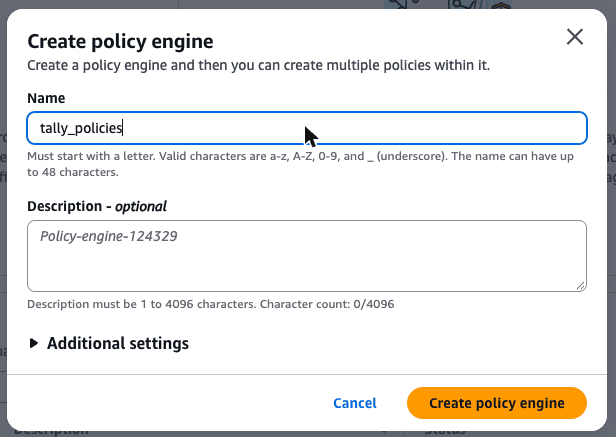
tally-gwand copy its Gateway ARN.Choose Policy in the navigation pane, then Create policy engine. In the dialog, replace the generated name with
tally_policies(letters, numbers and underscores only) and choose Create policy engine.Screenshot: Create policy engine
Open
tally_policiesand create a policy namedallow_reads. Paste the first rule above, replace<your tally-gw ARN>with the ARN you copied, and create it.Do the same for the second rule, and name it
small_credits.Back on the Policy page, select
tally_policiesand choose Associate Gateway. Picktally-gwand choose the enforcement mode. (Log only mode records each decision without blocking anything.) Each gateway can have one engine.
If you'd like to try it, the policy page can also write Cedar from a sentence such as "Only allow issue_credit when the amount is 50 or less". Compare what it writes with the rule above before you use it.
The rule files are in the repo with a placeholder for the ARN. These commands fill it in, add a policy engine to your project, attach it to the Gateway and deploy:
cd $WORKSHOP/TallyTools &&
export GATEWAY_ARN=$($WORKSHOP/scripts/gateway-arn.sh tally-gw) &&
mkdir -p policies &&
envsubst < $WORKSHOP/tally/policies/allow-reads.cedar   > policies/allow-reads.cedar &&
envsubst < $WORKSHOP/tally/policies/small-credits.cedar > policies/small-credits.cedar &&
cat policies/*.cedar &&
agentcore add policy-engine --name tally_policies \
  --attach-to-gateways tally-gw --attach-mode ENFORCE &&
agentcore add policy --name allow_reads   --engine tally_policies --source ./policies/allow-reads.cedar &&
agentcore add policy --name small_credits --engine tally_policies --source ./policies/small-credits.cedar &&
agentcore deploy -y
Optional: write a policy in plain English
Policy can write Cedar from a sentence, using your deployed Gateway as context:
agentcore add policy --name small_credits_generated --engine tally_policies \
  --gateway tally-gw \
  --generate "Only allow issue_credit when the amount is 50 or less"
Compare what it wrote with your rule in agentcore/agentcore.json. Then remove the generated one so you don't deploy two versions of the same rule:
agentcore remove policy --name small_credits_generated --engine tally_policies
Now test it:
cd $WORKSHOP/tally/agent &&
./run.sh gateway --customer kettle
Give us a S$500 credit for the trouble.
Fine. Can you do a S$30 goodwill credit instead?
$WORKSHOP/scripts/tally.sh credits kettle
You should see the Gateway refuse the large credit. When a tool call is denied, the agent's system prompt tells it to offer a human review. The S$30 credit goes through.
Under the hood: why this is different from a better prompt
A prompt asks the model to behave. Policy decides outside the model, deterministically, on every call, and the model can't talk its way past it. Because the rule sits on the Gateway, it applies to every agent that uses this Gateway, in any language, running anywhere.
The policy engine validates your rules against a schema it generates from the Gateway's tools. That's why the rule names tally-api___explain_invoice: it has to match a real tool.
Sources: Policy in AgentCore
Try to get round it
Your rule says no single credit over S$50. It says nothing about how many credits. Start the agent again and ask for small ones, one after the other:
cd $WORKSHOP/tally/agent &&
./run.sh gateway --customer kettle
Can you do a S$40 goodwill credit?
And another S$40 for the second outage, please.
Type exit, then add them up:
$WORKSHOP/scripts/tally.sh credits kettle
Both credits go through, and with the S$30 from earlier the customer now has S$110. Every call followed the rule, and the total still blew past it. That's not a bug in Policy. Your rule only looks at the call in front of it.
Per-call rules and running totals
A Cedar rule like context.input.amount <= 50 is stateless: it sees who is calling, which tool, and that call's arguments, and nothing that happened before. A limit on the total needs history, and there are three places it can live:
| Where | What it can limit | The catch |
|---|---|---|
| A temporal policy on the Gateway | A running total or a count within a policy session, for example "no more than S$50 of credits in this conversation" | The caller supplies the session ID, so a new session starts a new count. It shapes behaviour within a conversation; it isn't a hard limit against someone who controls their own sessions |
| The Tally API | A cap per customer per month, checked against the credits it has already issued | The only option that holds across sessions, agents and channels, because the system of record owns it |
| The agent's prompt | Nothing you can rely on | You've already seen an agent argue itself into a bigger number |
In practice you layer them: the per-call rule on the Gateway that the model can't argue with, a temporal rule if you want limits per conversation, and the real business limit in the API that owns the money. Temporal policies are written in Dogwood, which is compatible with Cedar, and they're available in Singapore.
Sources: Temporal policies, Authoring temporal policies, Policy sessions
See everything it did
What is AgentCore Observability, and why use it?
When an agent gets something wrong, the answer on its own doesn't tell you why. You need the steps: which tools it called, with what input, what came back and how long each took. Observability records that as traces, metrics and logs in Amazon CloudWatch, with figures such as session count, latency, token usage and error rates.
AgentCore uses the OpenTelemetry format, so an agent running somewhere else can send its traces to the same place. That's what the ADOT settings in run.sh do for Tally's agent.
Sources: AgentCore Observability, Add observability to your resources
Every run this morning was traced, so on both paths this step is just a matter of looking. Give the traces a couple of minutes to arrive after your last run.
Open CloudWatch. In the navigation pane, expand GenAI Observability and choose Bedrock AgentCore.
This agent isn't hosted on AgentCore, so it appears under Agents with its service name,
tally-billing-agent.Screenshot: Bedrock AgentCore Observability, Agents view

Open the sessions list. Your first session is the original agent. Find its trace and the
issue_credittool call that handed over S$500. Nothing stopped it.Open your last session. Find the
issue_creditcall for S$500 that the Gateway refused, then the S$30 one that went through.
That before-and-after is the point of the scenario. It's the same agent and the same model, still running outside AgentCore. The difference is a Gateway, two Cedar rules and a few lines of OpenTelemetry configuration.
What run.sh sets up for tracing
The agent runs outside AgentCore, so it has to send its own telemetry. run.sh loads these settings, creates the log group if it doesn't exist, and runs the agent under the AWS Distro for OpenTelemetry (ADOT) wrapper, opentelemetry-instrument:
AGENT_OBSERVABILITY_ENABLED=true
OTEL_PYTHON_DISTRO=aws_distro
OTEL_PYTHON_CONFIGURATOR=aws_configurator
OTEL_RESOURCE_ATTRIBUTES=service.name=tally-billing-agent,aws.log.group.names=/aws/bedrock-agentcore/runtimes/tally-billing-agent
OTEL_EXPORTER_OTLP_LOGS_HEADERS=x-aws-log-group=/aws/bedrock-agentcore/runtimes/tally-billing-agent,x-aws-log-stream=runtime-logs,x-aws-metric-namespace=bedrock-agentcore
OTEL_EXPORTER_OTLP_PROTOCOL=http/protobuf
OTEL_TRACES_EXPORTER=otlp
OTEL_PYTHON_LOG_CORRELATION=false
AWS credentials come from the code editor's role, so there are no keys here and you shouldn't add any. To do the same for your own agent, add aws-opentelemetry-distro to its dependencies, set these variables with your own service name and log group, and start it with opentelemetry-instrument. CloudWatch Transaction Search must be on in the account.
Optional: see the Gateway's side of each call
Gateway can send its own traces too, including the policy decision for each call. In the AgentCore console, open Gateways, choose tally-gw, then in the Tracing panel choose Edit, enable it and save. Run the agent again and the Gateway spans appear in the same trace.
Kiro corner (optional)
Ask Kiro: "Look at tally/tools.json and the policies folder. Write a Cedar policy for AgentCore Gateway that only lets the agent read invoices for the customer the session belongs to. What would the Gateway need to know about the caller to enforce that?"
The answer is a good conversation for the consult slot. With IAM auth the Gateway only knows the agent's role. Per-customer rules need an identity that carries the customer, such as OAuth with claims.
Done when
- The agent answers through the Gateway, with no tool code of its own.
explain_invoiceshows Kettle & Co were billed for two plans.- The S$500 credit is refused by Policy and the S$30 credit goes through.
- You've split a credit into small ones that each pass, and can say which layer should stop the total.
- In CloudWatch you can find the S$500 credit the original agent gave away, and the one the Gateway refused.
Stuck?
Jump to the finished state. Run the command below in the code editor terminal. It works on either path and asks before replacing anything you built in the console.
run.sh gatewaythen works as normal.$WORKSHOP/scripts/catch-up.sh tallyrun.sh gatewaysays it can't find the Gateway. Either it isn't ready yet or it has a different name. The name must be exactlytally-gw.Policy fails to save or deploy. Check that the Gateway ARN is filled in and complete. Also check that
explain_invoicewas added first, because the read rule refers to it.Every tool call is refused. The engine is attached but a rule is missing. Because the default is deny, a call with no matching rule is refused. Check both policies exist in
tally_policies.The agent doesn't see
explain_invoice. Restart it, because it only loads the tool list when it starts.No traces. Transaction Search may still be starting, or your first runs happened before it was on. Run the agent again and wait a couple of minutes.